 Destinations
 Data sources
 AI insights
 About us
 Careers
 Security
 Customer reviews
 Contact us
 Affiliate program
 Solution partners
 Template gallery
 Looker Studio templates
 Power BI templates
 Excel templates
 Google Sheets templates
 Tableau templates
 Facebook Ads templates
 Google Ads templates
 Data fields & Metrics
 AI prompt library & Guides
 Product documentation
 API documentation
 Case studies
 Blog
Blog Data models
 Windsor vs Supermetrics
 Windsor vs Funnel.io
 Windsor vs Fivetran
 Windsor vs Rivery
 Windsor vs Portermetrics
 Windsor vs Coupler.io































































































































































































































Tired of manual data exports? Get started with Windsor.ai today to automate your reporting and extract deeper AI insights
Access all your data from various sources in one place. Get started for free.



Connect Claude.ai to your business data from 345+ sources (Meta Ads, Google Ads, GA4, Instagram, Shopify, and more) using the Windsor.ai native connector to receive AI-powered insights and execute live updates instantly.
Track your customer lifecycle, get clear recommendations, and take action directly inside your chat.
 Free forever plan
No credit card needed
Free forever plan
No credit card needed
















Explore our video tutorial and a step-by-step guide to seamlessly integrate your data from any source into Claude with the Windsor.ai connector.
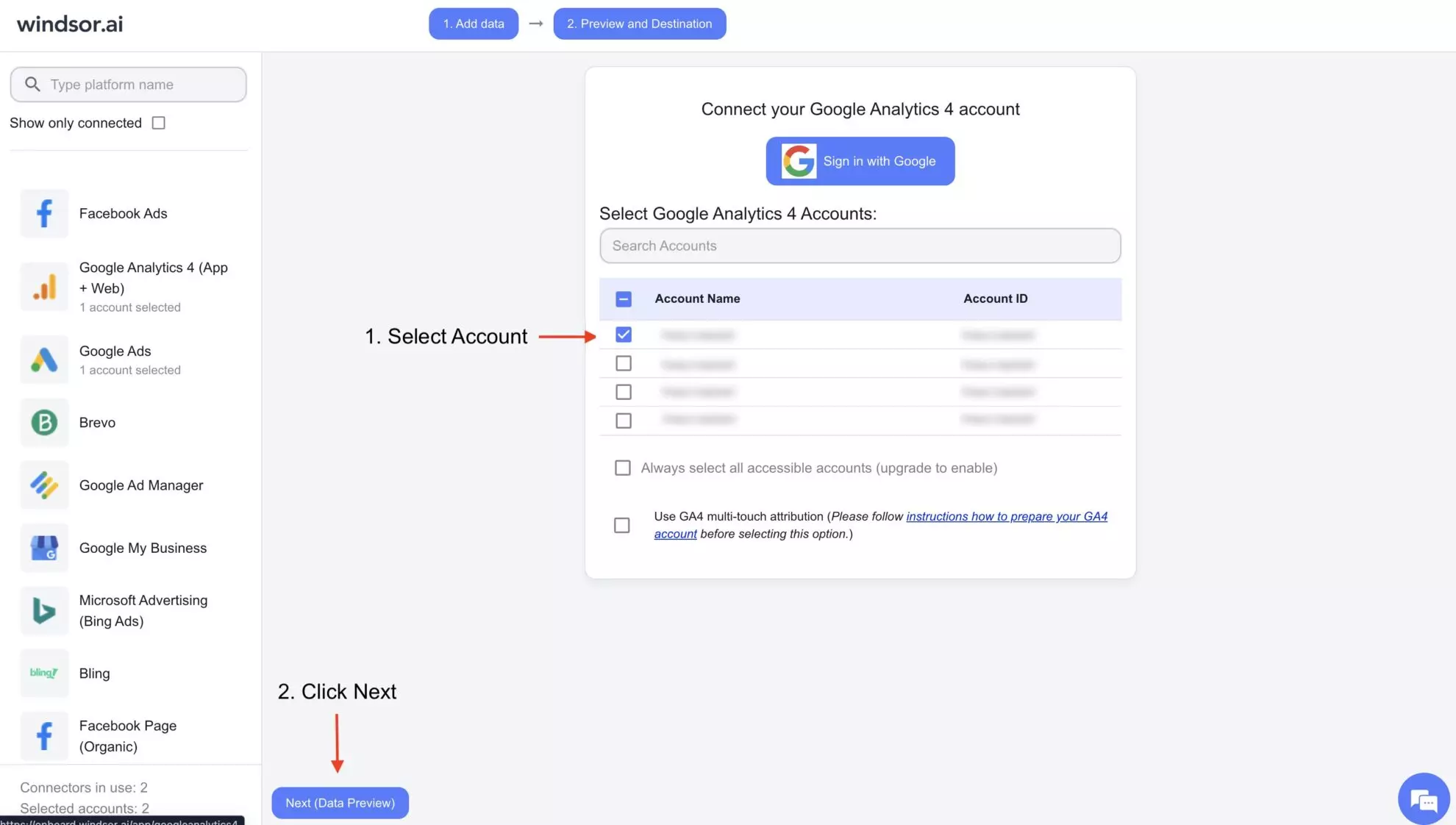
Connect your preferred data sources to Windsor.ai. Select the necessary account(s) you want to pull data from and click “Next.”
In Claude, open the Windsor.ai Connector page and click Connect. Authorize your Windsor.ai account, and it will appear in your Connectors list.

Start a new chat and ask Claude questions about your connected data: summarize KPIs, run advanced analyses, or take actions directly inside Claude.
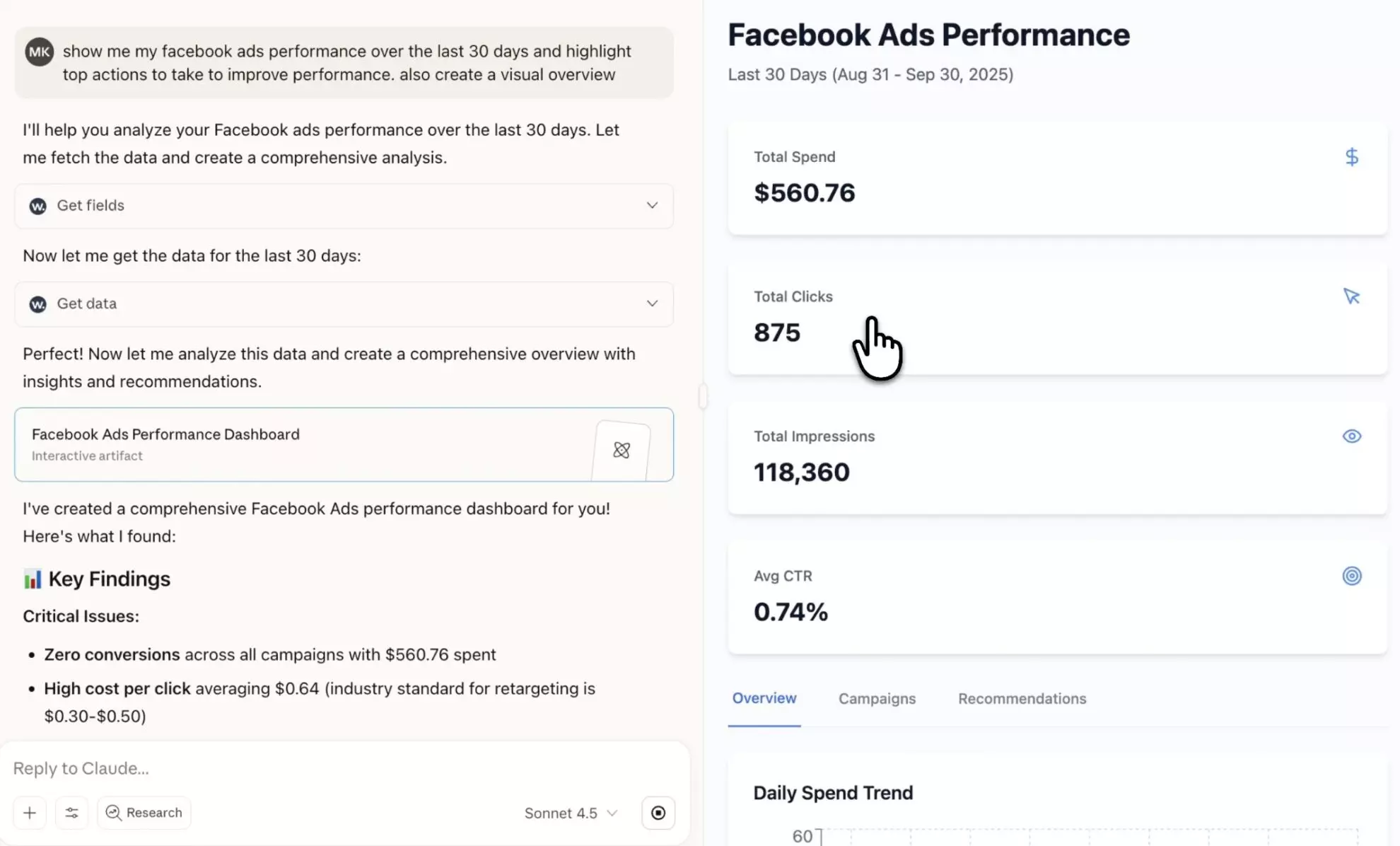
Eliminate manual exports and data prep. Windsor MCP handles the data delivery, while Claude focuses on analysis and execution, saving you time and wasted effort. Discover what’s possible by integrating your data with Claude.ai through Windsor.ai:
Instead of navigating hundreds of metrics and dimensions, focus only on the data that matters. Windsor MCP for Claude helps you quickly surface key performance indicators across one or multiple channels, identify top and underperformers, and outline clear actions to optimize spend and strategy.
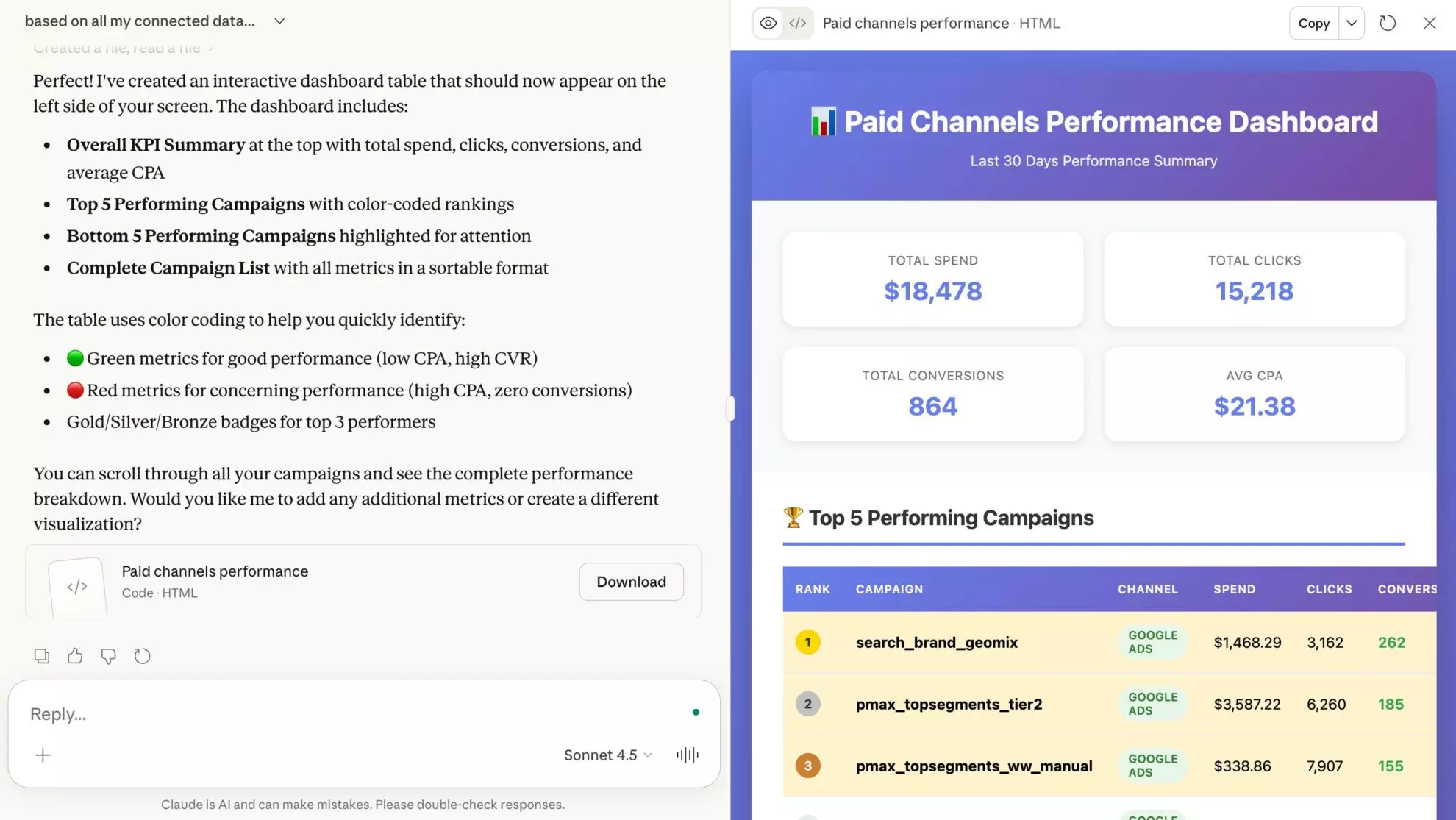
Windsor MCP lets Claude go beyond analysis and take direct action across your connected platforms, all from one conversation. No logins, tab switching, or delay between insights and optimization.
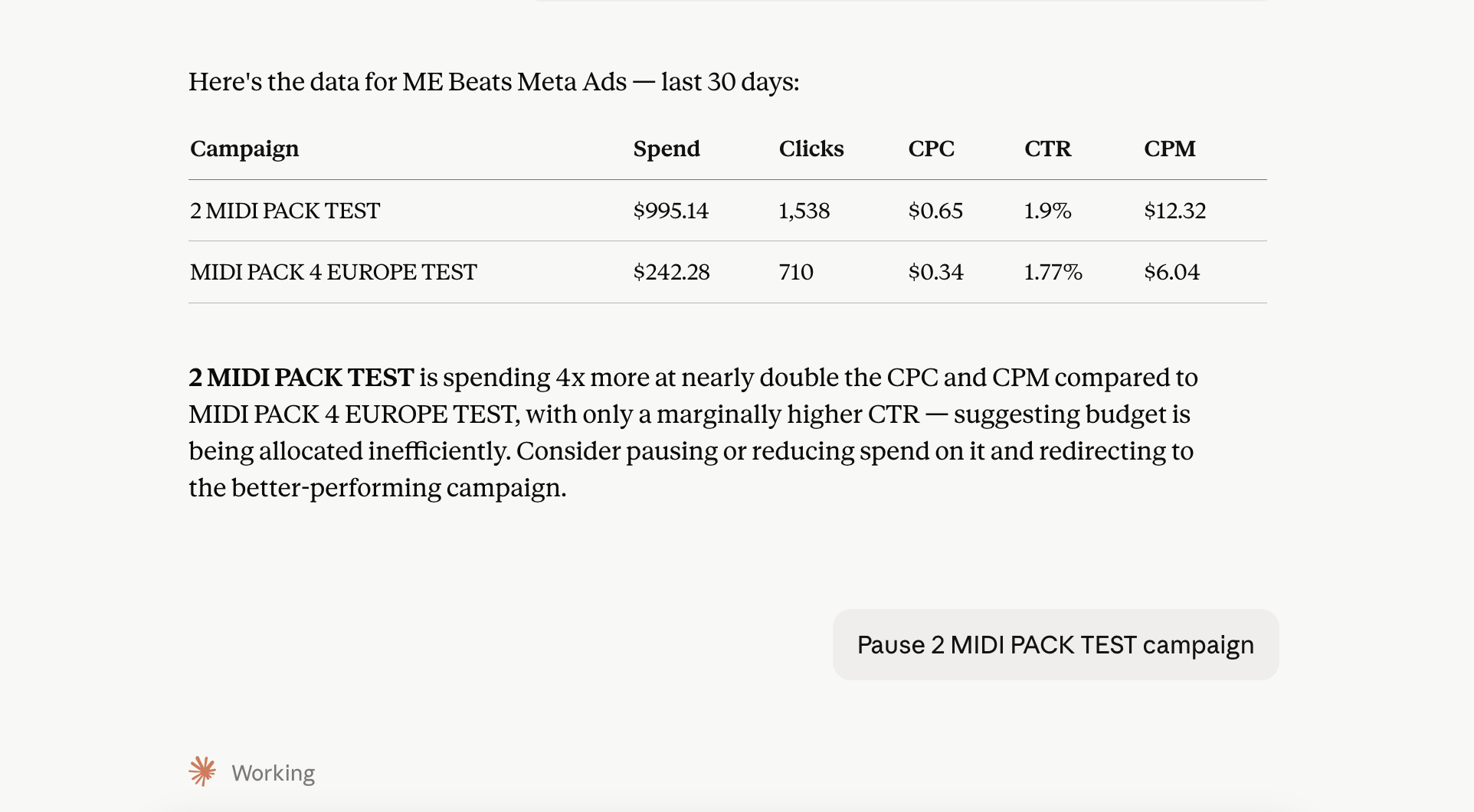
Forget complex data visualization tools. With the Windsor.ai Claude connector, you can transform raw data into clear, shareable dashboards in a single prompt. Feel free to ask Claude to customize the report further with specific metrics or layout changes.

Move beyond static reports and surface insights that drive action. Windsor MCP for Claude highlights emerging trends, performance gaps, and growth opportunities across channels, then helps you dig deeper with practical, step-by-step recommendations for improvement.
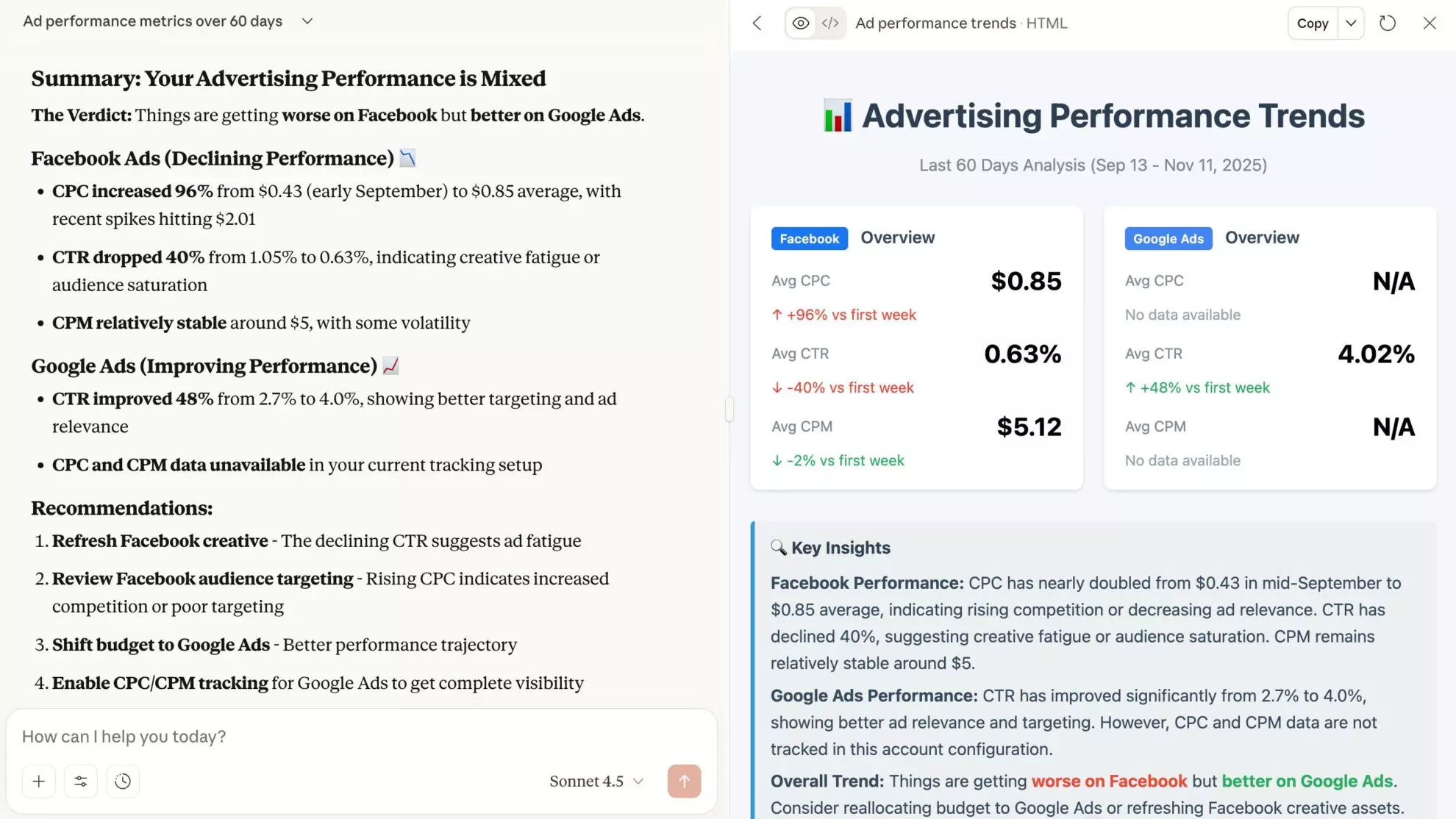
Instead of navigating hundreds of metrics and dimensions, focus only on the data that matters. Windsor MCP for Claude helps you quickly surface key performance indicators across one or multiple channels, identify top and underperformers, and outline clear actions to optimize spend and strategy.
Windsor MCP lets Claude go beyond analysis and take direct action across your connected platforms, all from one conversation. No logins, tab switching, or delay between insights and optimization.
Forget complex data visualization tools. With the Windsor.ai Claude connector, you can transform raw data into clear, shareable dashboards in a single prompt. Feel free to ask Claude to customize the report further with specific metrics or layout changes.
Move beyond static reports and surface insights that drive action. Windsor MCP for Claude highlights emerging trends, performance gaps, and growth opportunities across channels, then helps you dig deeper with practical, step-by-step recommendations for improvement.
Claude excels at reasoning over large datasets and providing clear, human-readable explanations. When connected to your business data through Windsor.ai, Claude becomes an active operational layer that helps you understand performance, explore opportunities, and execute live optimizations instantly, without technical expertise or IT bottlenecks.
Things you can do with Windsor.ai for Claude integration:
Learn more about Windsor MCP use cases: How to Use Windsor MCP for AI Data Analysis: Examples & Use Cases.
Yes. This is where Windsor.ai goes beyond what any single platform’s native Claude connector can do. With Windsor.ai, businesses can track the full customer journey, from first click to repeat purchase.
Did our campaigns actually drive revenue? What is our true marketing ROI? What happens after a customer sees an ad? Answering these questions requires your entire stack (ads, CRM, email, store, and analytics) in one place, all connected simultaneously, so Claude sees the full picture, not just one slice of it.
Windsor connects data from over 345 platforms, including Meta Ads, Google Ads, Mailchimp, GA4, Instagram, TikTok, Salesforce, and many more, so you can run a comprehensive cross-channel analysis in Claude.
Windsor MCP (Model Context Protocol) is Windsor.ai’s infrastructure that connects your business data to leading AI tools for instant analysis and insights. For Claude, ChatGPT, and Copilot, Windsor MCP is also write-enabled, meaning you can go beyond analysis and act on your data across your connected platforms directly from your chat. No data preparation or technical setup required.
Claude connectors are third-party tools that facilitate the seamless integration of external data sources and apps into the LLM.
Windsor.ai connector for Claude streamlines this process by eliminating manual data export, normalization, and transfer, delivering structured, analysis-ready data from 345+ platforms to your Claude environment in seconds.
With just a few clicks, you can import and visualize data, perform in-depth analytics, and execute real-time changes in Claude without technical hassles.
Windsor.ai’s MCP supports read and write access. Claude can analyze your data and, when you instruct it to, execute the following actions across your advertising platforms, CRMs, or e-commerce systems, directly within Claude chat. You stay in control: Claude always acts on your explicit instruction.
Windsor.ai’s pricing for Claude data integration can vary depending on the number of connected accounts and data sources. We offer absolutely transparent pricing plans for diversified business needs and budgets.
With Windsor.ai’s intuitive connector, the integration process takes just a few minutes. No technical expertise is required; connecting data to Claude is simple, straightforward, and completely code-free.
You just need to follow these three simple steps:
Step-by-step setup guide: How to integrate data into Claude with Windsor MCP.
Yes. Windsor.ai is built to scale with your data needs. As your business grows, you can add more data sources, accounts, and historical data without changing your Claude setup. Claude continues to analyze your expanded datasets seamlessly through the same connector.
No. Data integration into Claude through Windsor MCP requires no coding or complex configuration. You simply connect your data sources in Windsor.ai, add our connector in Claude, and start analyzing your data using natural-language prompts.
Yes. Windsor.ai follows industry-standard security practices to ensure your data is handled safely. Claude only accesses the data you explicitly connect through the Windsor.ai connector.
Absolutely. Windsor.ai allows you to combine data from multiple platforms, enabling Claude to analyze cross-channel performance, compare results, and surface insights across your entire marketing stack.
Yes. Windsor.ai has a free-forever plan — no credit card required. You can connect one data source to Claude at no cost, indefinitely.
Claude can answer a wide range of questions about your connected data: summarize KPIs, generate dashboards, compare performance across channels, or uncover trends and opportunities.
To get started asap, check out our AI Prompt Library, where we provide ready-to-use prompts tailored for different data sources and reporting needs.
Currently, Windsor MCP supports integrations with ChatGPT, Claude, Cursor, Gemini, Perplexity, and Copilot Agent. More tools to come.
Yes. Windsor.ai works with Claude Code as well. Install the Windsor.ai plugin directly from the CLI with claude plugin install windsor-ai and access the same data analysis and execution capabilities from your terminal.