 Destinations
 Data sources
 AI insights
 About us
 Careers
 Security
 Customer reviews
 Contact us
 Affiliate program
 Solution partners
 Template gallery
 Looker Studio templates
 Power BI templates
 Excel templates
 Google Sheets templates
 Tableau templates
 Facebook Ads templates
 Google Ads templates
 Data fields & Metrics
 AI prompt library & Guides
 Product documentation
 API documentation
 Case studies
 Blog
Blog Data models
 Windsor vs Supermetrics
 Windsor vs Funnel.io
 Windsor vs Fivetran
 Windsor vs Rivery
 Windsor vs Portermetrics
 Windsor vs Coupler.io
Connect Facebook Ads to Power BI
Quickly import your Facebook (Meta) Ads data into Power BI with Windsor.ai for instant visual dashboards.
Our powerful ETL connector helps you automatically sync data, visualize ad performance, and uncover actionable insights into your advertising strategy.
Forget CSVs. Stop copy/paste. Connect data in 2 minutes. No code required.
 Sign up with Google
 Free forever plan
No credit card needed
Free forever plan
No credit card needed








Automate ad reporting with Facebook Ads to Power BI integration
By pulling data from Facebook Ads to Power BI through Windsor.ai’s ETL connectors, you can easily visualize your ad data and track key metrics like impressions, click-through rate, reach, and many more. Evaluate the performance of your Meta Ads campaigns at scale and refine your strategies to attract more customers. This seamless integration makes it all possible:

Centralize Facebook ads data
Analyzing different types of Facebook Ads separately can be time-consuming and inefficient. Centralizing your Facebook Ads data in Power BI provides a unified view, allowing you to uncover integral insights into customer behavior, campaign performance, and return on investment.

Analyze Facebook Ads data interactively
Interactively analyze Facebook Ads data using Power BI’s visualization tools like graphs, charts, and maps. Create dynamic reports and dashboards to optimize ad spend and improve the efficiency of your marketing efforts.

Leverage attribution modeling
Analyze your Facebook Ads touchpoints and their impact on revenue. Identify key touchpoints that drive conversions to optimize budget allocation and ad spend efficiency. Power BI also enables you to understand user behaviors, demographics, and preferences, allowing you to tailor your ad messaging for better audience engagement.

Rely on predictive analytics
Utilize Power BI’s advanced analytics and machine learning models to predict the future performance of your Facebook Ads campaigns. Identify trends and make data-driven adjustments to enhance campaign effectiveness.

Monitor data in real time
Power BI enables real-time tracking of your Facebook Ads campaigns, allowing you to quickly react to performance changes and adjust bidding strategies. This helps you capitalize on emerging opportunities and pause underperforming ads to prevent budget wastage.
Using Windsor.ai connector to import data from Facebook Ads into Power BI
Most available methods of syncing ad data with Power BI can be complex, costly, and require technical expertise. Windsor.ai simplifies this process, making it affordable and fast.
Our ETL connector automatically imports Meta data into Power BI in minutes with no code and complex technical configurations.















How to connect Facebook Ads to Power BI in Windsor.ai
Windsor.ai supports two Power BI integration methods: Desktop and Web.
Follow our step-by-step guide and video tutorials to get started quickly.
Register and log in to Windsor.ai
Create a new Windsor.ai account or log in if you already have one.

Select your data source
Choose Facebook Ads as your data source and grant access to Windsor.ai.

For Power BI Desktop: Save your query and select it in the app
- Save a query if you’re building a custom report in Power BI Desktop
- In Power BI Desktop, go to Get Data → Windsor → Sign in
- Select your saved query from Windsor and click Load
Video instructions: https://www.youtube.com/watch?v=Zf-3JYC1d1Q.
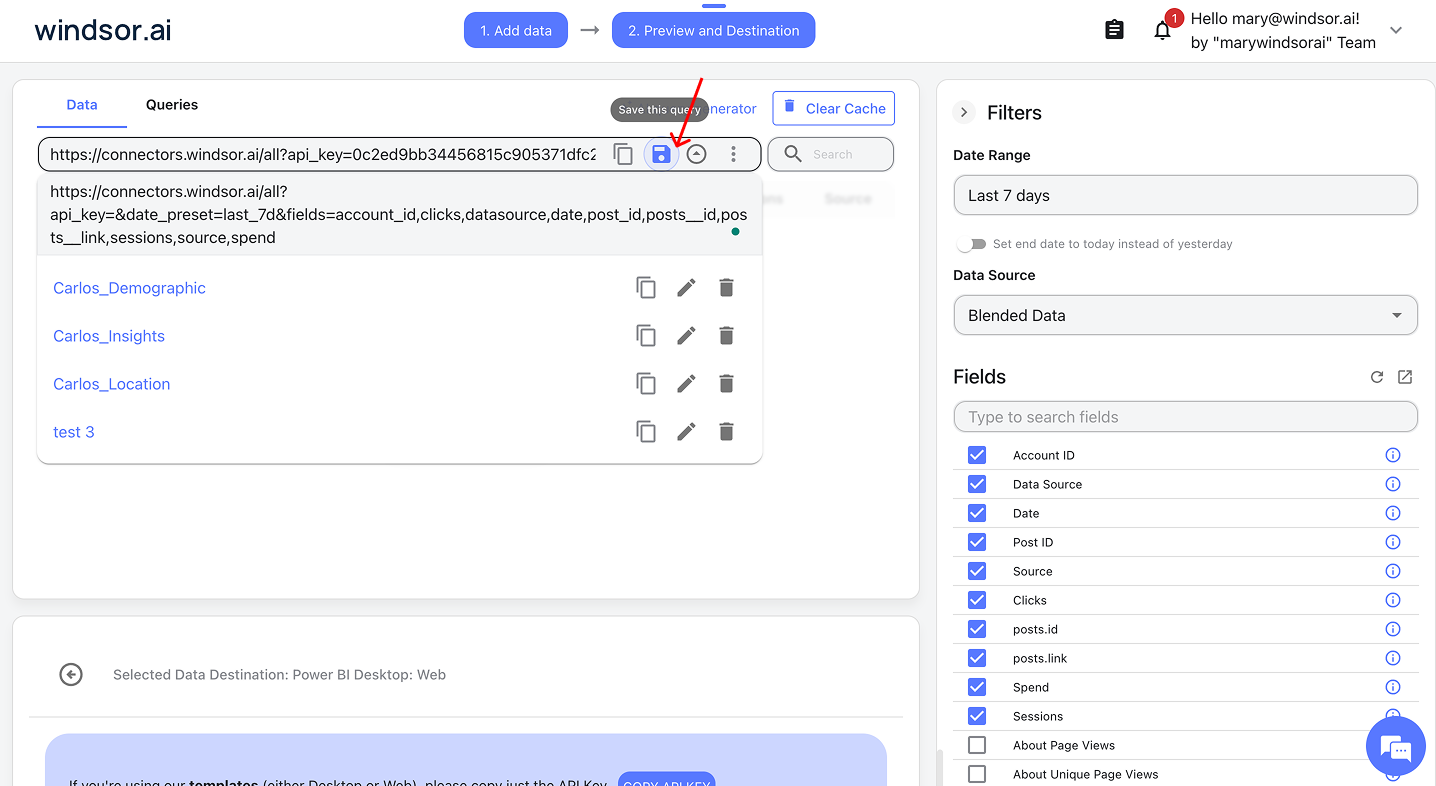
For Power BI Web: Copy your Windsor query URL
- Copy your query URL if you’re using Power BI Web
- In Power BI, go to Get Data → Web, paste your copied query URL, and click Ok
- Let the dashboard auto-load data
Video instructions: https://www.youtube.com/watch?v=L1NeAKUwqXk.
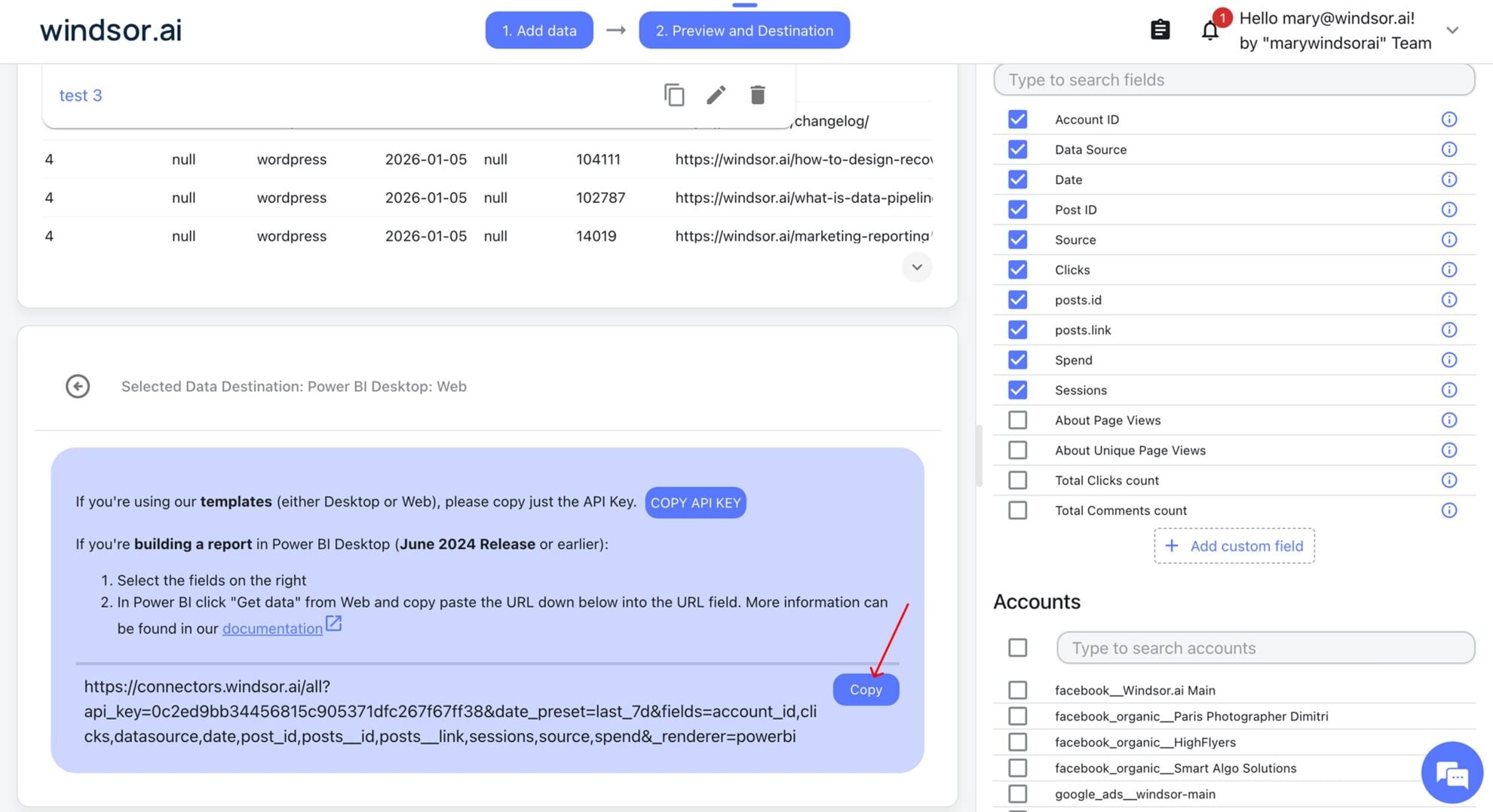
For Power BI templates: Connect your data via the API key
-Open the Facebook Ads template (Web or Desktop) from our Power BI template gallery
-Copy your Windsor.ai’s API key and insert it into the template start screen to sync your data
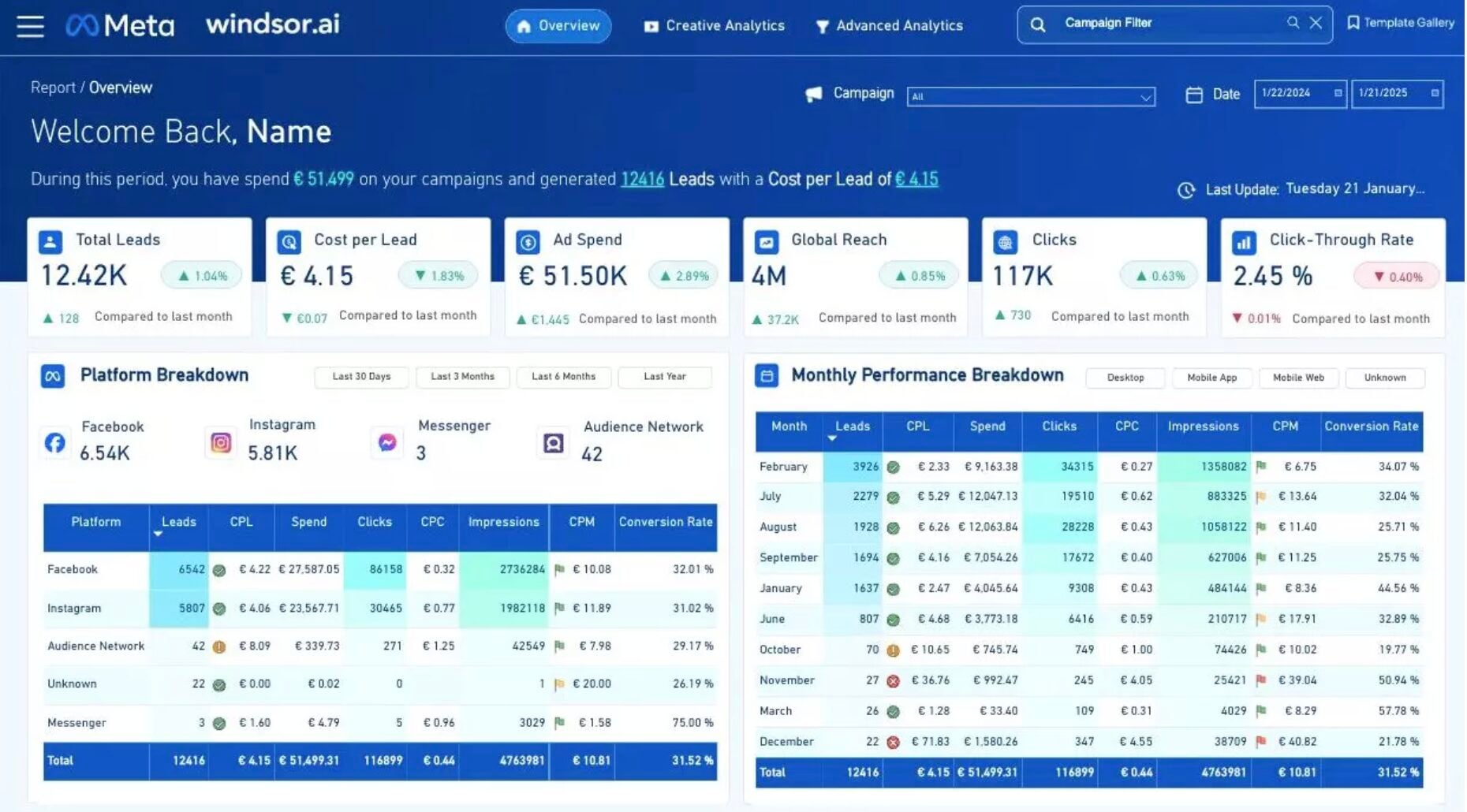
Build and refresh your report
Congratulations, you’ve connected your Facebook Ads data to Power BI via Windsor.ai. Now, you can visualize it in the preferred way.

FAQs
What is Power BI?
Power BI is a cloud-based data visualization and business intelligence tool developed by Microsoft that transforms raw data into interactive reports and dashboards for better decision-making. It includes a range of data connectors, apps, and software to extract, transform, and visualize data from multiple sources. The platform is user-friendly, offering drag-and-drop functionality for easy report creation and consistent formatting across visualizations. Power BI dashboards are customizable, enabling users to track key performance indicators and gain valuable insights tailored to their analytics needs.
Do you have helpful links to get started with integrating Facebook Ads and Power BI using Windsor.ai?
Yes, we have helpful resources to help you get started. You can explore our official documentation and ready-to-use templates for seamless Facebook Ads to Power BI integration with Windsor.ai:
How much time do I need to create the Facebook Ads and Power BI integration?
Windsor.ai provides a user-friendly interface and a powerful data connector that enables you to integrate Facebook Ads with Power BI in under 5 minutes, making the process quick and hassle-free.
How much does it cost to integrate Facebook Ads into Power BI with Windsor.ai?
Windsor.ai’s pricing for Facebook Ads into Power BI data integration can vary depending on your use case and data volume. We offer transparent pricing plans tailored to diverse business needs and budgets.
Tired of manual Facebook Ads data exports? Get started with Windsor.ai today to automate your reporting


