 Destinations
 Data sources
 AI insights
 About us
 Careers
 Security
 Customer reviews
 Contact us
 Affiliate program
 Solution partners
 Template gallery
 Looker Studio templates
 Power BI templates
 Excel templates
 Google Sheets templates
 Tableau templates
 Facebook Ads templates
 Google Ads templates
 Data fields & Metrics
 AI prompt library & Guides
 Product documentation
 API documentation
 Case studies
 Blog
Blog Data models
 Windsor vs Supermetrics
 Windsor vs Funnel.io
 Windsor vs Fivetran
 Windsor vs Rivery
 Windsor vs Portermetrics
 Windsor vs Coupler.io
 Last updated: 24 August 2026




Looker Studio (known as Google Data Studio) offers 20+ free native connectors that sync with Google-affiliated platforms, plus several hundred paid partner connectors for everything else — the exact partner count fluctuates as Google periodically prunes its Connector Gallery, but it typically sits in the 800-1,200+ range.
Your company may store Data on an Excel file, Google Sheets, Google BigQuery, and many other sources. Looker Studio is the perfect place to unite all the data in a single platform.
Being able to visualise data helps you get valuable insights for better decision-making in your business and gives you a serious advantage when it comes to getting competitive opportunities.
There are many tools available to help visualize data, but as Looker Studio is entirely free and accessible to all, more organizations and individuals have been preferring Looker Studio over other platforms. Once you are familiar with the tool, it can be used to create stunning and informative reports for your company.
This article will introduce you to the different types of Looker Studio Connectors. Let’s get started.
Free vs. paid Looker Studio connectors: what’s the difference?
Free Looker Studio connectors are Google’s own native connectors — Google Ads, Google Analytics 4, BigQuery, Search Console, and roughly 20 more — built and maintained directly by Google at no cost. Paid connectors are third-party partner connectors that pull data from non-Google platforms — Facebook Ads, TikTok Ads, Salesforce, Stripe, and hundreds more — typically priced anywhere from $20 to $500+ per month depending on the provider and number of data sources connected.
In short: if your data lives entirely inside Google’s ecosystem, the free native connectors cover you. The moment you need social ads, CRM, or e-commerce platforms in the same report, you’re looking at a paid connector.
What are Looker Studio Connectors?
Looker Studio connector is a feature that helps to automatically pull data from your tracking and analysis tools. These connectors enable direct connection between the Looker Studio to any data source which is internet accessible.
To put it simply, these connectors in Looker Studio function as instruments enabling the seamless transfer of marketing data from one source, like Zoho, to Looker Studio.
Looker Studio boasts a large arsenal of connectors — typically 800-1,200+ depending on when you check the gallery — giving marketers the versatility to extract data sets from a wide range of popular marketing platforms.
Types of Looker Studio Connectors
There are three types of connectors in the Looker Studio Connector Gallery, which are as given below:
1. Google Connectors
The Looker Studio team is behind the development of Google Connectors. These are used to connect to the Google-owned data sources and platforms such as Google Ads, BigQuery, Youtube Analytics, etc.
Here is a list of free Looker Studio connectors:
|
Google Sheets |
BigQuery | Google Ads |
File Upload |
| Amazon Redshift | Cloud Spanner | Google Cloud Storage | Microsoft SQL Server |
| Cloud SQL for MySQL | Google Ad Manager 360 | MySQL | Search Ads 360 |
| YouTube Analytics | Google Display & Video 360 | Google Campaign Manager (CM360) | Search Console |
| Google Analytics 4 | Google Surveys | Extract Data | PostgreSQL |
2. Partner Connectors
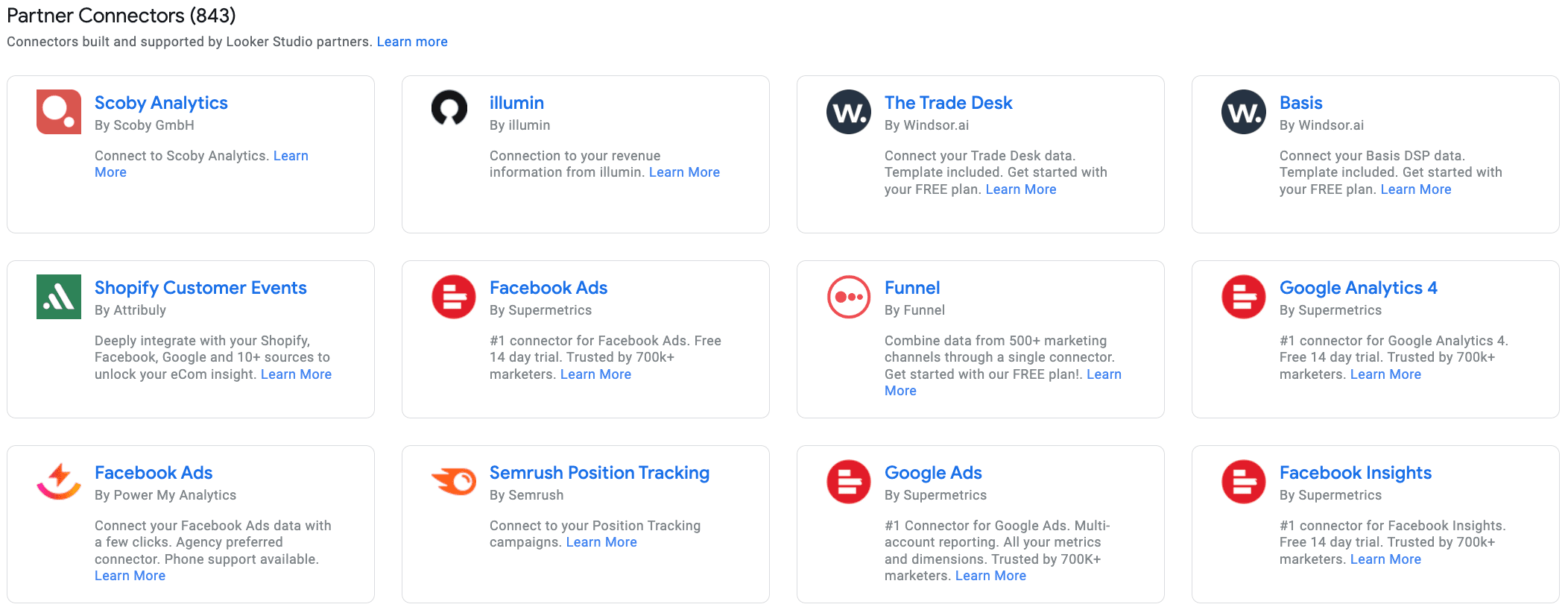
Google calls these connectors “Looker Studio Partners”. These are usually SEO, Data reporting, and tracking platforms. These connectors pull data from a variety of sources, including social media platforms such as Facebook Ads, Shopify, AdRoll, etc.

Get started for free
Access all your data from your favorite sources in one place.
Free forever plan, no credit card
3. Open Source Connectors
These connectors are developed and maintained by the Looker Studio open-source community team.
How to Use Looker Studio Connectors
Below is a detailed guide on using Looker Studio Connectors:
- Open Looker Studio and click on “Create.” From there, you can opt to add a new data source or a new report.
- In both cases, you will be directed to the connectors gallery. Here, you’ll decide whether to create a Looker Studio report or dashboard.
- Next, you’ll have the choice to connect to Looker Studio sources or My Data sources. This allows you to either add a new data source from the beginning or incorporate data you’ve already linked.
- Proceed to the “Connect Data” tab.
- Log in to your Google account to gain access to connectors.
- Authorize Looker Studio to retrieve data from the sources.
Steps following the sixth one will vary depending on the specific connector and may require separate instructions.
Finally, you’ll have the option to customize Looker Studio connectors, including:
- Modifying the connector name
- Setting data freshness intervals
- Selecting the data type for each field
- Configuring permissions
- Adding custom formulas
Paid Looker Studio Connectors
Windsor.ai provides the facility to set up a dashboard for working with Looker Studio. Once done, the Windsor.ai system will instantly pull up data as much as information sources that you need.
The best part is that the entire process just takes a few minutes as all you need to do is validate data sources. You can sign up for our free forever plan to see firsthand how it works.
We’re focusing on the non-Google connectors here as the Google connectors already with great documentation and are in general very reliable.
Media Looker Studio Connectors
1. Facebook Ads
This connector pulls all information you need from the Facebook Ads API into Looker Studio. Inside Looker Studio the data can then be blended with your analytics or CRM data.
2. Bing Ads / Microsoft Ads
Similar to the Google Ads connector provided by Google this connector allows to pull performance data from your Microsoft Ads (formerly known as Bing Ads) account and visualise it in Looker Studio.
Here is a Bing Ads Looker Studio template to get you started.
3. LinkedIn Ads
This connector connects to your LinkedIn Campaign Manager account and extracts all metrics and dimensions to Looker Studio. Similar as with the other connectors the data can either be shown in an own dashboard or it can be blended with Analytics data sets.
Here is a Linkedin Ads Looker Studio template to get you started.
4. X (Twitter) Ads
5. AdRoll
6. TikTok Ads
7. Pinterest Ads
8. Snapchat Ads
9. Criteo
10. AppNexus
11. Windsor.ai
12. Salesforce
13. Hubspot
14. Stripe
15. Shopify
16. Amazon Seller Central / Amazon SP
Top 5 Looker Studio Connector Providers
1. Windsor.ai
Windsor provides a relatively concise selection of data connectors for Looker Studio, yet it encompasses most of the essential ones that modern companies require. While it supports over 350+ data connectors, it doesn’t boast the largest assortment of native data sources.
If your objective is to integrate marketing and sales data from Google platforms, various social channels, and your CRM system, Windsor is an enticing choice, particularly if you use HubSpot or Salesforce as your CRM.
Presently, Windsor stands out as an excellent option for emerging retail brands and businesses placing a premium on social media marketing, especially on visually-oriented platforms. Moreover, its integration with Stripe makes it an intriguing choice for companies with both online and physical storefronts, seeking to merge their online and in-store data.
With its accessible entry-level pricing, Windsor is a feasible choice for small and nascent ventures.
Windsor runs a free plan that covers you for an one data sources and allows you to create a single report as a single user. Paid plans start at $19/month for the Basic plan, which allows you to connect three data sources.
2. Supermetrics
Supermetrics functions as an analytics system centered around connectors, enabling the aggregation of data from diverse sources and the management of insights within a unified platform. Additionally, it provides a dedicated Looker Studio tool that supports over 70 connectors for importing data from leading marketing and sales platforms.
While it may not offer the most extensive array of data connectors available, Supermetrics covers all the essential ones. However, there’s a possibility that certain tools you use may not have connectors available in Supermetrics.
Supermetrics has moved away from a simple flat “single connector” plan — pricing now starts in the ~$29-37/month range but scales with add-on fees per extra data source (~$37/month each) and per extra ad account (~$13/month each), so the real monthly cost depends heavily on how many sources you connect. See our full Supermetrics pricing breakdown for current numbers.
3. Funnel.io
Funnel provides one of the most extensive collections of Looker Studio connectors on the market.
In addition to its robust connector offering, Funnel is an enterprise-grade analytics system and Looker Studio connector equipped with a range of advanced features.
Funnel.io restructured its pricing in 2026 and no longer offers a free tier for new signups — the Starter plan now starts around $200-400/month, with a Business plan around $800/month, and real-world contracts (based on connectors, destinations, and usage) frequently running well into the thousands per month. See our Funnel.io alternatives comparison for more detail.
4. Adverity
Adverity is a data management system with an impressive array of connectors. The platform’s foundation lies in its network of data connectors and destinations, enabling the importation of data from hundreds of sources. This data can then be managed within Adverity or exported to third-party destinations, including Looker Studio.
The free version of Adverity serves as a capable Looker Studio connector, granting access to the complete library of 600+ supported connectors. If you’re seeking a straightforward data connector with extensive support for various data sources (eliminating the need for custom connectors), Adverity stands out as an exceptional choice.
Adverity doesn’t publish fixed plan pricing — it’s quote-based, with third-party estimates typically placing costs in the $500-2,500+/month range depending on data volume and the number of connectors, plus separate implementation costs for larger deployments.
5. DataSlayer
The Dataslayer is a reporting tool designed for tracking and analyzing your online PPC/SEM marketing metrics. It seamlessly integrates with both Google Sheets and Looker Studio.
Dataslayer offers free and paid plans tailored to meet the needs of freelancers and agencies. Dataslayer runs a free plan that covers you for all connectors, unlimited accounts per connector, unlimited simultaneous login and unlimited number of reports.
Pricing begins at roughly $29/month for its entry plan (currently covering 3 connectors), though Dataslayer is transitioning to a new user- and connector-based pricing model in 2026 — existing customers keep their current pricing, but new signups should check current plan details directly.
Determining the optimal selection between native and third-party connectors for Looker Studio
Deciding between native and third-party connectors for Looker Studio depends on your specific requirements. Consider the following factors:
1. Data Compatibility
Native Looker Studio connectors seamlessly integrate with Google apps like Google Analytics and Google Ads. If your primary data sources are from Google, native connectors may be the most straightforward choice.
2. Features and Functionality
Partner Looker Studio connectors may provide extra features or capabilities that are not available in native connectors.
3. Support and Maintenance
Native connectors are supported by Google, while partner connectors are supported by their respective developers.
4. Cost
Native connectors for Google products are free, although certain advanced features or increased usage may incur additional fees. Third-party connectors can vary from free to paid, depending on the provider and the level of functionality they offer.
Integrate all your marketing data from different data sources in Looker Studio
Windsor.ai’s web connectors can help you solve this problem. It can collect and update data every time you refresh the Looker Studio dashboard. The Looker Studio itself enables users to dive deeper and look at data from different angles. It effectively cuts down the time spent on creating reports. With quicker insights, marketers can focus on optimizing ads or setting up new campaigns.
We will guide through, getting all your Marketing Platforms Data using our Looker Studio connectors.
Note: To be able to create the dashboard you will need to connect your data here
-
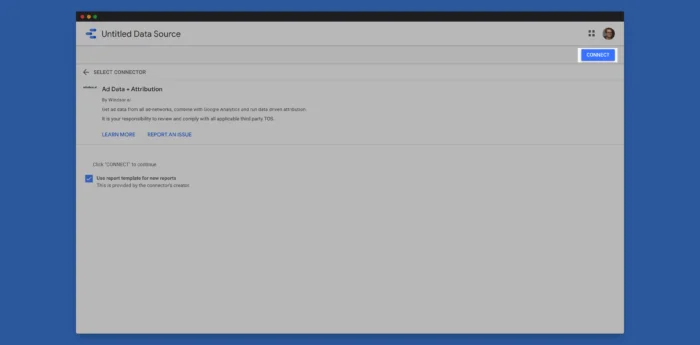
Install the Windsor.ai Looker Studio Connector here

Note: If you have any questions about connecting your data you might find this how-to useful
-
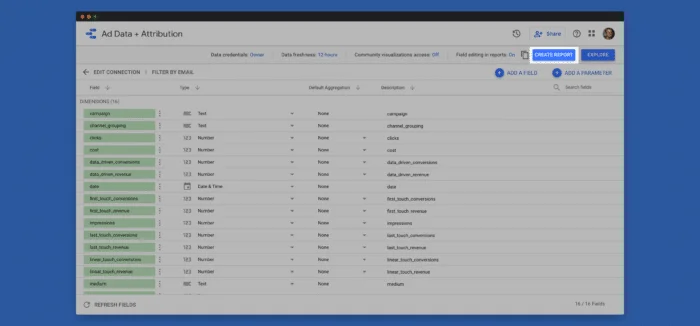
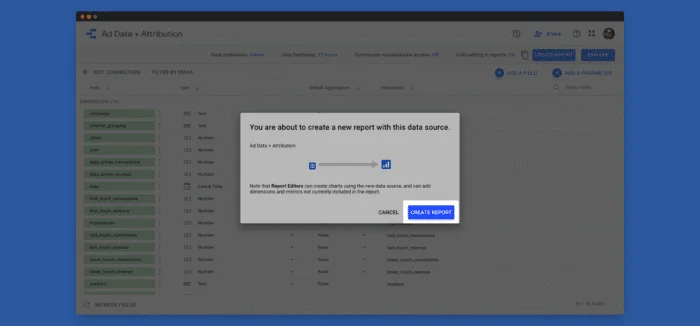
Click on CREATE REPORT

-
Click on CREATE REPORT again

-
Now your dashboard is ready

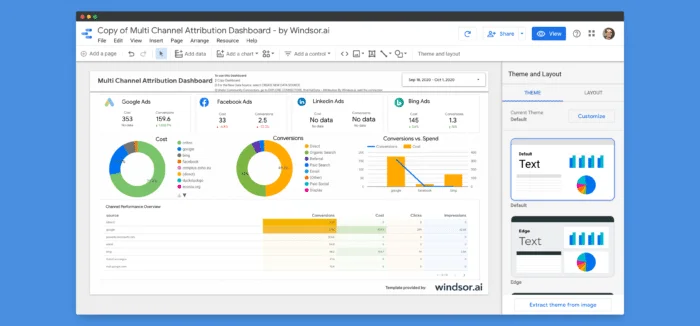
That was easy, wasn’t it? Enjoy exploring your data! We hope that this will allow you to save time on manual tasks.
Conclusion
Marketing agencies primarily prefer Looker Studio due to its extensive list of connectors. Looker Studio Connectors help you import data into the Looker Studio dashboard.
Windsor.ai has native connectors to all widely used marketing platforms and CRM’s. We also make it easy to do transformations to match the customer journeys from the different tools easily.
Windsor.ai’s connectors can help you connect Looker Studio with popular data warehouses like Azure Synapse, BigQuery, and Snowflake. With BigQuery, which is a Google product, Looker Studio works like a dream. You do not have to write a single SQL line to combine tables.
Advantages of using Windsor.ai
No more using CSV dumps and spreadsheets to bring together data from different Software-as-a-Service (SaaS) systems. With Windsor.ai, all your data is delivered to a relational data warehouse, giving you clarity across all of your data sources.
Once all your data is in a single location, things become easy. Enable machine learning or connect the most powerful visualization tools: the opportunities are endlessly exciting. Use Windsor.ai to integrate your data with Looker Studio to provide a boost to your business.
We won’t convince you to purchase a plan, but at least give it a try on our free forever plan, and you’ll see the benefits we could bring to your team.
- 350+ data sources
- Forever Free Plan
- SOC 2 Type 2 certified, supports single sign on and multi factor authentication
- Capterra Review score average 4.8 out of 5
- All connectors available on all plans: No premium connectors
- Email and live chat support
- Database destination pricing independent of row count
FAQs
Why build a Looker Studio connector?
Looker Studio Community Connectors was a program devised by Google to develop an open-source project which will help in bringing public and open data sets around the world to the Looker Studio users freely and with ease to access.
Let us delve into the reasons.
1. Community Connectors are powerful and easy to build
Using Google Apps Script, not only you can build the connectors but can also deploy them easily. You will also get the services and APIs such as caching, storage, translation, JDBC services, etc at your disposal.
You can build, deploy and distribute connectors for free and can use these connectors for free in Looker Studio.
2. Promotion and monetization of your connector
If you are developing/building a Community Connector, you can publish and promote it in the Looker Studio Connector Gallery. All the users of the Looker Studio platform can explore this gallery from inside the platform. There is also a public Connector Gallery viewable by anyone.
3. Open data for everyone
Connectors connect all the Looker Studio users to all the public and open data sets around the world with ease.
Building a Looker Studio Community Connector provides significant value to your customers. You can rely on Looker Studio as a free and powerful reporting and analysis solution for your customers with the minimal development effort.


